Dockerfile Security Best Practices: How to Build Secure Containers

1. Introduction
Docker is a revolutionary technology that enables developers to build, deploy & maintain applications in a lightweight, portable, and efficient way (known as containers).
One can think of containers similar to a ‘Virtual Machine’ but with additional advantages. The docker containers are lightweight, efficient, and ideal for modern applications since they package code and dependencies while sharing the OS kernel. They consume less space, boot faster, and support higher scalability than Virtual Machines. VMs on the other hand are heavier and include a full OS for each instance.
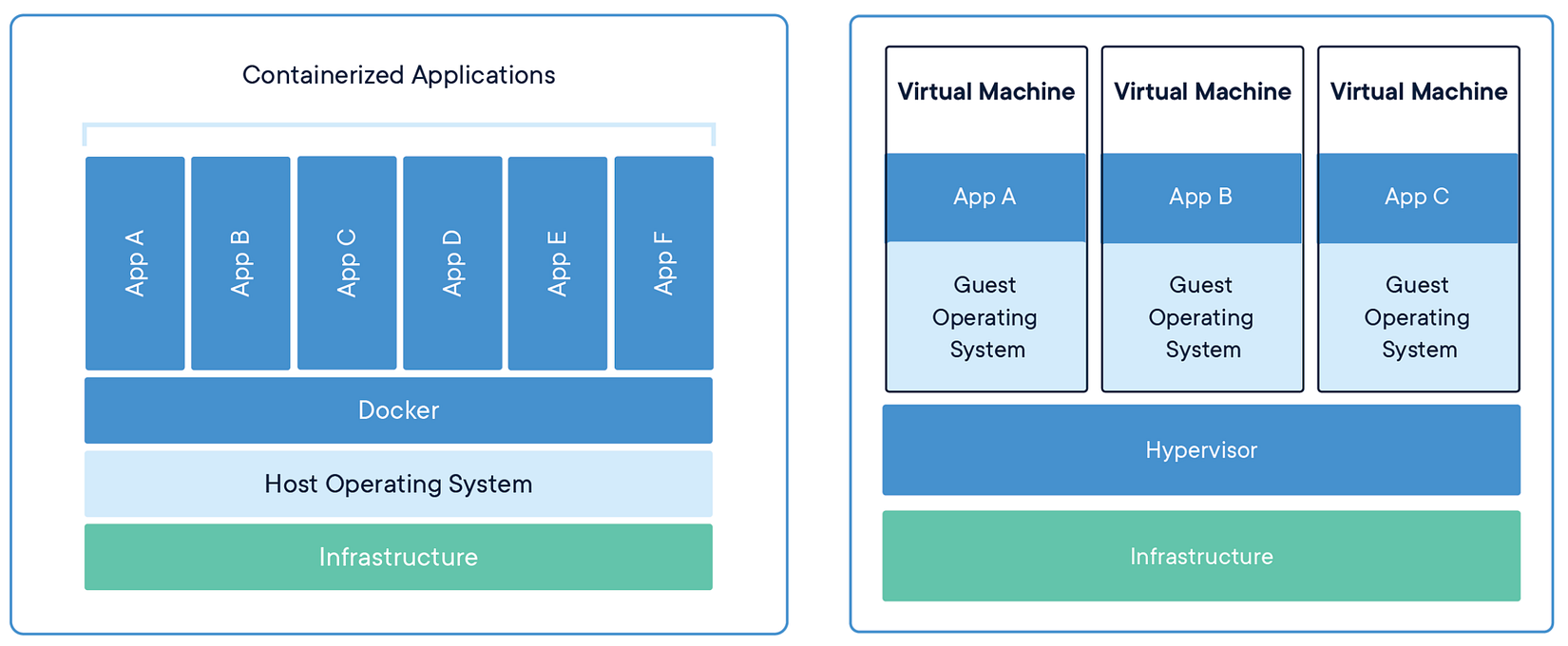
Architecture : Containers v/s Virtual Machine [ Image-Source: docker.com ]
Virtual Machines provide better resource isolation and are suited for legacy systems, containers are the go-to choice for resource-efficient, scalable, and portable deployments.
2. Comprehensive Overview of a Dockerfile
Dockerfile can be visualized as the blueprint for building docker container images. A Dockerfile specifies the base image, application files, required libraries, configurations, and the commands to execute for building and running the application.
Each instruction in the Dockerfile is executed sequentially to create a reproducible and consistent image that can be deployed as a container across various environments, ensuring reliability, portability, and streamlined application deployment.
A Dockerfile creates a Docker Image, which is used in Docker Containers. [ Image-Source: cto.ai ]
Understanding the structure and components of a Dockerfile is critical to maintaining robust security standards.
3. Understanding Docker Container Security
The security of a Docker container relies on its Dockerfile; it is not entirely dependent but to a great extent. This means developers must be conscious about what they are writing in Dockerfile. This means including only the libraries, base images, and custom configuration explicitly declared in your Dockerfile — while avoiding malware, known vulnerabilities, and other threats.
Misconfigurations in Dockerfiles can introduce vulnerabilities, operational challenges, and unnecessary complexity. Below, we dive into the most critical security pitfalls and their implications, helping developers understand why getting these configurations right is essential.
3.1 Using Bloated or Unverified Base Images
Using large or unverified images adds unnecessary packages and unrequired dependencies that increase the attack surface. Images from untrusted sources can contain malicious software or vulnerabilities that infect your build pipeline.
What Could Go Wrong?
Attackers can inject malware into unverified base images, compromising your entire CI/CD pipeline.
Bloated images result in slower deployment and runtime inefficiencies.
Example of a Misstep :
FROM ubuntu:latest
Using ubuntu:latest means you might pull a different image every time you build, creating inconsistent environments.
Solution:
Pin your base image to a specific, verified version, preferably one optimized for security.
FROM ubuntu:20.04
3.2 Not Pinning Versions of Packages
Failing to pin versions for packages creates unpredictability. A future build might introduce an untested or vulnerable version of a dependency, breaking your application or exposing security loopholes.
What Could Go Wrong:
A zero-day vulnerability in an updated package might leave your application exposed.
Your builds become inconsistent, making troubleshooting and rollbacks difficult.
Example of a Misstep:
RUN apt-get update && apt-get install -y curl
Solution:
Pin versions for installed packages to ensure predictable builds.
RUN apt-get update && apt-get install -y curl=7.68.0-1ubuntu2.12
3.3 Running as a Root User
Containers running as root can execute privileged operations, increasing the risk of privilege escalation attacks. Even if the container is compromised, a non-root user limits the attacker’s capabilities.
Switching to a non-root user as early as possible minimizes the time during which the container runs as root. This reduces the attack surface if any commands in your Dockerfile are vulnerable.
What Could Go Wrong:
An attacker who exploits a vulnerability in your app could gain root access to the host.
It becomes easier for misconfigured containers to escape their isolation.
Example of a Misstep:
FROM debian:11-slim

# Create a non-root user
RUN groupadd -r appgroup && useradd -r -g appgroup appuser

# Switch to non-root user immediately
USER appuser

# Subsequent commands will not execute as root
WORKDIR /app
COPY . /app
ENTRYPOINT ["./myapp"]
Solution:
Create a non-root user and switch to it in your Dockerfile. Assign the necessary permissions explicitly. Applications often write temporary files to default locations like/tmp, but restrictive permissions may cause errors. The the /tmp directory might lack appropriate permissions for non-root users. This permission can be given to a user or group using Chown.
RUN groupadd -r appgroup && useradd -r -g appgroup appuser
RUN mkdir -p /app && chown appuser:appgroup /app
WORKDIR /app
USER appuser
3.4 Combining Too Many Layers Without Cleanup
Layers in Docker images retain every intermediate state, even if the data is deleted later. Sensitive information or large files may inadvertently remain in the image history.
Build tools like gcc or make are often unnecessary in the production image and can be abused by attackers to compile and execute malicious code.
What Could Go Wrong:
Temporary files like build artifacts or secrets might be accessible through
docker history.Bloated images slow down deployment and increase attack surfaces.
Example of a Misstep:
RUN apt-get update && apt-get install -y git \
    && rm -rf /var/lib/apt/lists/*
Solution:
Use multi-stage builds to ensure sensitive data and unnecessary artifacts are excluded from the final image.
FROM golang:1.19 as builder
WORKDIR /app
COPY . .
RUN go build -o myapp
FROM alpine:3.18
WORKDIR /app
COPY --from=builder /app/myapp .
ENTRYPOINT ["./myapp"]
3.5 Using ADD Instead of COPY
The ADD instruction offers additional functionality (e.g., extracting archives, fetching files from remote locations), which might introduce unintended behavior or vulnerabilities.
What Could Go Wrong:
If an attacker compromises the remote source, your build will include malicious content.
Archives might overwrite critical files in the container.
Example of a Misstep:
ADD https://example.com/app.tar.gz /app/
Solution:
Always use COPY for local files. Use tools like wget or curl for remote downloads, coupled with checksum verification.
COPY app.tar.gz /app/
RUN tar -xzvf /app/app.tar.gz -C /app/
3.6 Leaving Secrets in the Dockerfile
Hardcoding sensitive information like API keys, credentials, or certificates exposes your secrets to anyone who can access the image or the Dockerfile.
What Could Go Wrong:
Secrets committed to version control systems can be exploited by malicious actors.
Compromised secrets may lead to account takeovers, data breaches, or system compromises.
Example of a Misstep:
ENV API_KEY=12345
Solution:
Use secret management tools like vault, AWS Secrets Manager or Docker’s --secret flag to securely pass sensitive information at runtime.
RUN --mount=type=secret,id=api_key echo "API key mounted securely."
3.7 Ignoring Health Checks
Without health checks, Docker cannot determine if your application is functioning correctly. This can lead to undetected failures in production.
What Could Go Wrong:
Applications might continue running in a degraded state.
Monitoring tools may fail to detect critical failures.
Solution:
Define meaningful health checks to ensure the container is always operational.
HEALTHCHECK --interval=30s --timeout=5s \
  CMD curl -f http://localhost/health || exit 1
3.8 Neglecting Security Profiles
Running containers without restrictive security profiles (e.g., Seccomp, AppArmor) allows them to make dangerous syscalls, exposing the host to attacks.
What Could Go Wrong:
Attackers could use syscalls
ptraceto extract sensitive process data.Exploits like container escapes become possible.
Solution:
Enable Docker’s default Seccomp profile or define custom profiles for your application.
docker run --security-opt seccomp=default.json myimage
3.9 Example of an ideal Secure Dockerfile
# Use a minimal base image
FROM debian:11-slim
# Install dependencies securely
RUN apt-get update && apt-get install -y - no-install-recommends \
 curl=7.74.0–1.3+deb11u7 \
 ca-certificates \
 && rm -rf /var/lib/apt/lists/*
# Create a non-root user
RUN groupadd -r appgroup && useradd -r -g appgroup appuser
# Set working directory and permissions
WORKDIR /app
COPY - chown=appuser:appgroup . /app
# Switch to non-root user
USER appuser
# Define entrypoint and health check
ENTRYPOINT ["./myapp"]
HEALTHCHECK - interval=30s - timeout=5s CMD curl -f http://localhost/health || exit 1
4. Practical Example: Crafting a Secure Dockerfile
Let’s learn how to create a secure and production-ready Dockerfile for a Golang application. The example uses multi-stage builds, non-root users, and minimal base images to ensure security, efficiency, and maintainability.
Let’s first see the Dockerfile, and then we will break it line-by-line to understand how is it secure and optimized!
# Stage 1: Build the application
FROM golang:1.20 AS builder

# Set metadata
LABEL maintainer="iamlucif3r@example.com" \
      description="Secure and optimized Dockerfile for a Golang application"

# Set working directory
WORKDIR /app

# Copy go.mod and go.sum for dependency caching
COPY go.mod go.sum ./

# Download dependencies
RUN go mod download

# Copy the application code
COPY . .

# Build the application binary
RUN CGO_ENABLED=0 GOOS=linux go build -ldflags="-w -s" -o main .

# Stage 2: Create a minimal, production-ready image
FROM gcr.io/distroless/static:nonroot

# Set metadata
LABEL version="1.0.0"

# Set working directory
WORKDIR /app

# Copy the application binary from the builder stage
COPY --from=builder /app/main .

# Set the application to run as a non-root user
USER nonroot:nonroot

# Expose the application port
EXPOSE 8080

# Implement a health check
HEALTHCHECK --interval=30s --timeout=5s \
  CMD [ "curl", "-f", "http://localhost:8080/health" ]

# Start the application
CMD ["./main"]
4.1. Step-by-Step Breakdown
Let us understand writing a secure and optimized docker file, taking an example of dockerizing a Golang project.
4.1.1 Multi-Stage Build:
The first stage (
golang:1.20) is used to compile the application, ensuring development tools are not included in the final image.The second stage (
distroless/static:nonroot) is a lightweight and secure base image designed specifically for production use, with no shell or unnecessary utilities.
4.1.2 Dependency Caching:
- By copying
go.modandgo.sumbefore the application code, Docker can cache the dependency installation layer, reducing build times when dependencies remain unchanged.
4.1.3 Static Binary Compilation:
- The application is compiled with
CGO_ENABLED=0, which disables C dependencies and produces a fully static binary for better compatibility and security.
4.1.4 Non-Root User:
The distroless/static:nonroot image uses a default non-root user (nonroot), preventing privilege escalation attacks
4.1.5 Minimal Base Image:
- The
distrolessimage contains only the necessary libraries to run the binary, significantly reducing the attack surface.
4.1.6 Health Check:
- Docker monitors the application’s health and restarts it automatically if it becomes unresponsive.
4.1.7 Port Exposure:
- The
EXPOSEinstruction documents the container’s intended port (8080) for external access.
4.1.8 Size Optimization:
- Using
-ldflags="-w -s"during the build reduces the size of the binary by stripping debugging information.
5. Conclusion
Building secure Docker containers is not just a best practice but a necessity in today’s ever-evolving threat landscape. A well-written Dockerfile forms the foundation of a secure and efficient containerized application. By adhering to the principles outlined in this guide — such as using minimal and verified base images, pinning package versions, running containers as non-root users, leveraging multi-stage builds, and avoiding hardcoded secrets — you can significantly reduce the attack surface and enhance the reliability of your applications.
Security is not a one-time task but an ongoing process. Regularly update your Dockerfiles to incorporate the latest security recommendations, tools, and features. Employ automated scanning tools to detect vulnerabilities in base images and dependencies, and always test your Dockerfiles in controlled environments before deploying to production.
By following these practices, you not only ensure that your applications are secure but also create a robust development pipeline that promotes efficiency, scalability, and trustworthiness. In the rapidly growing world of containers, building secure Docker images is a critical skill that sets the stage for successful and resilient application deployments.